Introduction
Debugging is one of the most important skills in software development. Whether you are a beginner learning your first programming language or an experienced developer working on a complex application, errors are an unavoidable part of writing code. A missing semicolon, an incorrect variable, a database connection problem, or a complicated logic issue can prevent an application from working correctly. Finding the cause of these problems can consume valuable time, especially when error messages are confusing or the underlying issue is difficult to identify.
Artificial intelligence is changing how developers approach debugging. AI-powered coding assistants can analyze source code, explain error messages, identify potential problems, suggest corrections, and help developers understand why a particular solution works. Instead of spending hours searching through documentation or testing random fixes, programmers can use AI to investigate problems systematically.
Tools such as ChatGPT, GitHub Copilot, Claude, and other AI-powered development assistants can support different stages of the debugging process. They can explain programming concepts, suggest alternative implementations, generate test cases, and help developers investigate unexpected application behavior.
However, AI is not a perfect debugging solution. Its suggestions may occasionally be incorrect, incomplete, or unsuitable for a particular project. Developers must understand how to provide useful information, evaluate suggested changes, and verify that the final solution works as intended.
This article explains how to use AI to debug code, fix common programming errors, improve troubleshooting workflows, and write more reliable software.
1. Understanding AI-Powered Debugging
AI-powered debugging uses artificial intelligence to help identify, analyze, and resolve problems in software. These systems can examine code snippets, interpret error messages, recognize common programming mistakes, and recommend possible solutions.
Traditional debugging often involves reading code manually, placing breakpoints, inspecting variables, reviewing logs, and searching documentation. These techniques remain essential, but AI can accelerate the investigation by suggesting where a problem might originate and explaining potential causes in understandable language.
For example, imagine that a Python program displays the following error:
TypeError: unsupported operand type(s) for +: 'int' and 'str'
A developer might immediately understand the problem, but a beginner could struggle to determine why it occurs.
An AI assistant can explain that the program is attempting to add an integer and a string. It might recommend converting the string to an integer when the value represents a number or converting the integer to a string when the goal is text concatenation.
The important advantage is that AI provides context rather than simply identifying a suspicious line.
AI debugging can help with syntax errors, runtime exceptions, incorrect logic, performance problems, API failures, database issues, and testing difficulties. The effectiveness of the assistance depends on the quality of the code, error information, and instructions provided.
2. Choosing the Right AI Tool for Debugging
Different AI tools offer different debugging capabilities. Choosing the appropriate tool depends on your programming language, development environment, project complexity, and preferred workflow.
ChatGPT
ChatGPT can analyze code snippets, explain programming errors, suggest corrected implementations, and help developers understand unfamiliar concepts. It is particularly useful when you want to discuss an error interactively.
You can paste a function, share an exception message, describe the expected behavior, and ask for a step-by-step investigation.
For example, you could ask ChatGPT to identify why a Python function returns an incorrect result without requesting an immediate rewrite. This encourages a more focused explanation of the underlying issue.
GitHub Copilot
GitHub Copilot assists developers within supported development environments. Depending on the available features and configuration, it can provide code suggestions, explain existing code, and help investigate errors.
Its integration with the coding workflow can reduce the need to repeatedly copy code between an editor and a separate AI conversation.
Developers can use it to examine selected code, explore possible fixes, and generate tests. Suggested changes should still be reviewed before being accepted.
Claude
Claude can help analyze longer code snippets, explain complicated logic, and investigate problems involving multiple interacting functions. Its usefulness depends on the model, available context, and the information supplied.
Developers can ask it to compare alternative implementations, identify suspicious assumptions, or review a proposed correction.
IDE-Based AI Assistants
Some development environments provide AI features directly inside the editor. These tools may help explain diagnostics, suggest corrections, generate tests, or inspect project files when appropriate permissions are available.
For example, an assistant that can access relevant project files may have more context than one receiving a single isolated function.
Regardless of the tool, prioritize accurate explanations, compatibility with your development environment, privacy controls, and the ability to verify suggested changes.
3. How to Ask AI to Debug Code Effectively
The quality of an AI debugging response depends heavily on the quality of the information you provide.
A vague request such as “Fix my code” gives the assistant little context. It may generate a replacement without understanding the actual problem.
A better request explains what the code should do, what happens instead, and what error appears.
Include these five elements whenever possible:
- Programming language: Identify whether the code uses Python, JavaScript, Java, C++, PHP, or another language.
- Relevant code: Provide the smallest section that reproduces the problem.
- Error message: Include the complete traceback or relevant diagnostic output.
- Expected behavior: Explain what the program should produce.
- Actual behavior: Describe the result you receive.
Consider this example:
“My Python function should calculate the average of a list of numbers, but it raises a ZeroDivisionError when the list is empty. Explain why this happens and suggest a safe correction that preserves the existing function structure.”
This prompt identifies the language, problem, error, expected behavior, and desired approach.
You can also request that the AI explain the cause before providing a correction. This makes debugging more educational and reduces the likelihood of accepting changes you do not understand.
4. Using AI to Fix Syntax Errors
Syntax errors occur when code violates the grammatical rules of a programming language. Common examples include missing parentheses, unmatched brackets, incorrect indentation, missing quotation marks, and misplaced punctuation.
These errors are usually among the easiest for AI assistants to identify.
For example, consider this Python code:
print("Welcome to Python"The closing parenthesis is missing. An AI assistant can identify the problem and suggest:
print("Welcome to Python")However, syntax errors are not always obvious. A missing bracket in a long expression or an incorrectly indented block may cause the interpreter to highlight a later line rather than the original mistake.
To investigate such issues, provide the complete error message and the relevant surrounding code. Ask the assistant to identify the exact syntax problem and explain why the interpreter reports it.
After applying the correction, run the program again. Fixing one syntax error may reveal another that was previously hidden.
AI is especially useful for beginners because it can explain unfamiliar syntax rules rather than simply presenting corrected code.
5. Debugging Runtime Errors with AI
Runtime errors occur while a program is executing. Unlike syntax errors, they may appear even when the code is structurally valid.
Common examples include NameError, TypeError, IndexError, KeyError, AttributeError, and ZeroDivisionError in Python.
For example:
numbers = [10, 20, 30]
print(numbers[5])
This code attempts to access an element that does not exist. Python raises an IndexError.
An AI assistant can explain that list indexing starts at zero and that the available indexes in this example are zero, one, and two.
It might recommend checking the list length before accessing an element or correcting the index.
When investigating runtime errors, share the traceback, relevant variable values, and the operation that triggers the failure.
Ask the AI to distinguish between the immediate cause and the underlying reason. For instance, an invalid index might result from an incorrect loop boundary, not merely a wrong number in one statement.
This distinction is important because correcting the immediate error without addressing its cause may allow similar problems to return elsewhere.
6. Fixing Logic Errors with AI
Logic errors occur when a program executes without necessarily producing the intended result. These problems can be more difficult to identify because the application may appear to work normally.
Imagine a function that calculates a discount but subtracts the discount percentage directly from the original price instead of calculating the percentage of that price.
The program might run successfully while producing an incorrect total.
AI can help investigate logic errors by comparing the intended behavior with the actual implementation. Explain the expected result, provide representative inputs, and show the output currently produced.
For example, ask:
“Review this discount calculation function. For an original price of 1,000 and a discount of 20 percent, the expected final price is 800. My function returns an incorrect value. Identify the mathematical or logical mistake and explain the correction.”
The assistant can examine the formula, identify incorrect assumptions, and propose a revised implementation.
For more complicated functions, request a walkthrough using several inputs, including ordinary values, boundary cases, and unexpected inputs.
Nevertheless, developers should independently verify calculations and test the revised function against known results.
7. Using AI to Debug JavaScript Errors
JavaScript applications frequently encounter errors involving undefined values, asynchronous operations, incorrect object properties, event handlers, and API responses.
Consider this example:
const user = undefined;
console.log(user.name);
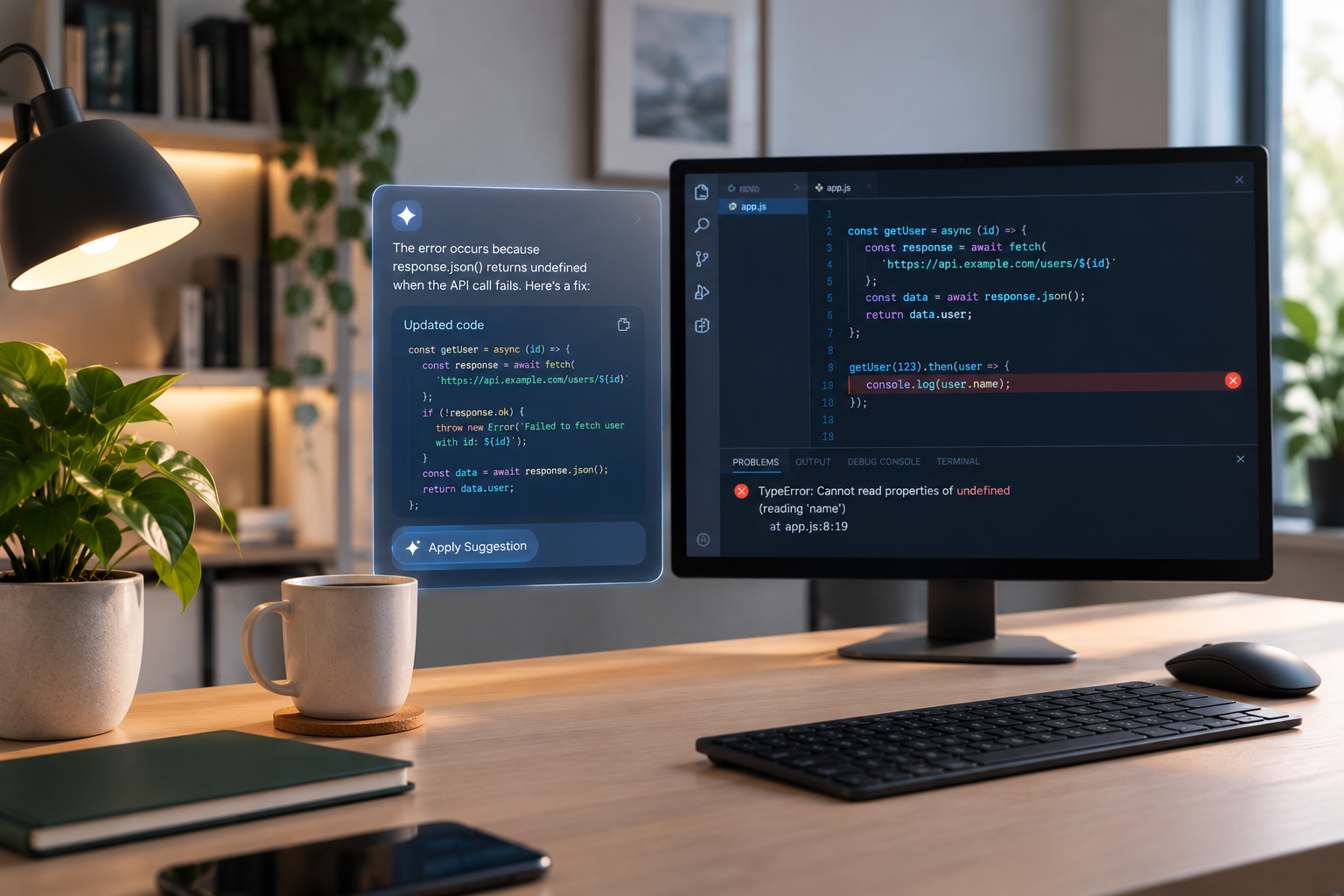
The program attempts to access the name property of an undefined value, resulting in a TypeError.
An AI assistant can explain why the property access fails and suggest validating the object before using it.
For example:
if (user) {
  console.log(user.name);
}
However, this check is only one possible solution. If the application requires a valid user object, the better correction may be to investigate why the object was never initialized.
AI can also help diagnose promises that reject unexpectedly, missing await statements, incorrect array methods, and problems involving asynchronous API requests.
When debugging frontend applications, provide the relevant JavaScript, browser console error, expected interface behavior, and any related network response.
For Node.js applications, include relevant terminal output and information about the runtime version when compatibility may be involved.
8. Debugging API and Database Errors
APIs and databases connect different parts of an application, making their failures difficult to diagnose without sufficient context.
Common API problems include authentication failures, invalid request parameters, incorrect endpoints, rate limits, timeout errors, and unexpected response formats.
Database problems may involve incorrect SQL queries, missing tables, invalid column names, connection failures, or incompatible data types.
AI can help interpret these errors and recommend a structured troubleshooting process.
For an API failure, provide the HTTP status code, relevant request structure, sanitized response body, and expected result. The assistant can help distinguish between client-side mistakes, authorization problems, and server-side failures.
For example, a 401 Unauthorized response often indicates that authentication information is missing, invalid, or insufficient. A 404 Not Found response may indicate an incorrect endpoint or an unavailable resource.
These status codes are clues rather than definitive explanations.
When debugging SQL queries, share the query, a simplified table structure, representative sample data, and the database error message.
Never share passwords, API keys, private access tokens, production credentials, or sensitive customer records with an AI assistant. Replace confidential values with placeholders before requesting help.
9. Finding and Fixing Performance Problems
Some applications are technically correct but execute slowly, consume excessive memory, or respond poorly under heavy workloads.
AI can help developers inspect algorithms, identify repeated operations, review database queries, and suggest performance improvements.
For example, a function that repeatedly searches an entire list inside a loop might become inefficient when processing thousands of records. An assistant could suggest using a set or dictionary for faster membership checks, depending on the data and required behavior.
Similarly, AI can help review inefficient SQL queries, unnecessary network requests, excessive rendering, and repeated calculations.
However, performance optimization should be evidence-based.
Before changing code, measure its execution time or memory usage. Use profiling tools, application logs, database query plans, and realistic workloads to identify the actual bottleneck.
Ask AI to explain the expected benefits and possible trade-offs of each optimization.
A shorter function is not automatically faster, and an optimization that works for a small example may perform poorly with real-world data.
After implementing changes, compare the results using equivalent test conditions.
10. Generating Test Cases with AI
Testing is essential for confirming that a debugging solution works correctly. AI can accelerate this process by suggesting test cases that cover normal inputs, edge cases, invalid values, and unexpected conditions.
Suppose you have a function that validates email addresses. An AI assistant might recommend testing ordinary addresses, missing domain names, empty strings, whitespace, and malformed input.
For numerical functions, useful test cases may include zero, negative numbers, very large values, decimal values, and empty collections.
AI can also generate unit tests using frameworks such as pytest for Python or Jest for JavaScript.
For example, ask:
“Generate unit tests for this function, including normal cases, boundary conditions, invalid inputs, and expected exceptions. Do not modify the original function.”
This separates testing from implementation and helps reveal assumptions that the original code may overlook.
Review generated tests carefully because AI may misunderstand requirements or create tests that simply reproduce the same incorrect logic found in the implementation.
Whenever possible, compare test expectations against independent requirements or verified examples.
11. Using AI to Understand Error Messages
Error messages often contain valuable diagnostic information, but their terminology can confuse beginners.
AI assistants can translate technical messages into understandable explanations and identify the parts that matter most.
A useful explanation should answer three questions:
- What does the error mean?
- What is the most likely cause?
- How can the problem be investigated or corrected?
For example, a Python KeyError indicates that a dictionary lookup attempted to access a key that was not present.
The appropriate solution depends on the situation. You might correct a misspelled key, check whether the key exists, use the dictionary’s get() method, or investigate why the expected data was missing.
Ask the AI to explain the error in simple language and identify what evidence would confirm its diagnosis.
This approach is particularly useful when working with unfamiliar libraries, frameworks, or programming languages.
12. A Step-by-Step AI Debugging Workflow
A consistent workflow helps developers use AI effectively without becoming dependent on unverified suggestions.
Step 1: Reproduce the problem. Run the application and identify the exact action or input that triggers the error.
Step 2: Collect diagnostic information. Record the error message, relevant logs, expected output, actual output, and environmental details.
Step 3: Isolate the affected code. Reduce the problem to a small, understandable example whenever possible.
Step 4: Ask AI for an explanation. Request likely causes and diagnostic steps before asking for a complete rewrite.
Step 5: Evaluate the proposed solution. Check whether it addresses the underlying problem and remains compatible with the project’s requirements.
Step 6: Apply a focused correction. Make the smallest reasonable change rather than rewriting unrelated parts of the application.
Step 7: Run tests. Verify the original failing case and test related functionality.
Step 8: Review the changes. Use version control or a code diff to understand exactly what changed.
Step 9: Investigate remaining failures. If the problem persists, provide the new evidence and ask the AI to reconsider its earlier diagnosis.
Step 10: Document the solution. Record the root cause and correction when the issue could recur or affect other developers.
This process combines AI assistance with established engineering practices.
13. Common Mistakes to Avoid When Using AI for Debugging
Although AI can be useful, several mistakes can reduce its effectiveness.
Accepting suggestions without testing: AI-generated code may contain mistakes. Always run appropriate tests before relying on a correction.
Providing insufficient context: An isolated error message may have several possible causes. Include relevant code and expected behavior.
Rewriting too much code: Large rewrites introduce unnecessary changes and make it harder to determine whether the original problem has been resolved.
Ignoring project requirements: A suggested solution might use a library version, programming feature, or architecture that your project does not support.
Trusting confident explanations: An AI assistant may present an incorrect diagnosis convincingly. Treat its response as a hypothesis to investigate.
Sharing confidential information: Remove secrets and sensitive information before submitting code or logs to external services.
Ignoring security implications: A correction that removes an error could introduce SQL injection, weak validation, unsafe file handling, or another vulnerability. Review security implications before deployment.
Failing to understand the fix: Developers should learn why a solution works rather than repeatedly copying corrections without understanding them.
Avoiding these mistakes makes AI debugging safer, more accurate, and more educational.
14. Best Practices for Reliable AI-Assisted Debugging
To obtain better results, treat AI as a collaborative debugging assistant rather than an unquestionable authority.
Start with specific questions. Instead of asking for a complete application rewrite, ask the assistant to inspect one function or explain one exception.
Request multiple possible causes when the evidence is incomplete. This encourages investigation instead of premature conclusions.
Ask for minimal changes and explanations. Understanding the reasoning behind a correction makes it easier to identify mistakes and maintain the code later.
Use reproducible examples. Small examples help isolate errors and make it easier to confirm whether a proposed correction works.
Keep track of changes with version control. Tools such as Git allow you to compare modifications, revert problematic changes, and review the history of a debugging session.
Follow established security practices. Review AI-generated code for insecure dependencies, exposed credentials, improper authorization, and unsafe input handling.
Finally, continue developing your own debugging skills. Learn how to read stack traces, use breakpoints, inspect variables, interpret logs, and write tests. These skills help you evaluate AI suggestions more effectively and solve problems that automated tools cannot fully understand.
Conclusion
AI is becoming an important part of modern software debugging. It helps developers interpret error messages, identify syntax mistakes, investigate runtime exceptions, correct logic problems, troubleshoot APIs, improve performance, and generate useful test cases.
Tools such as ChatGPT, GitHub Copilot, and Claude can make debugging faster by explaining problems and suggesting potential solutions. Their greatest value comes from combining automated assistance with human reasoning, systematic testing, and careful code review.
The most effective approach is to provide clear context, investigate the underlying cause, apply focused corrections, and verify the results. Developers should also protect sensitive information, evaluate security implications, and avoid accepting generated code without testing it.
Whether you are learning programming or maintaining a production application, AI can help make debugging more approachable and efficient. By using it thoughtfully, you can spend less time searching for mistakes, gain a deeper understanding of your code, and build more reliable software.